
Google turns Workspace into a context-aware AI work layer with Workspace Intelligence
Google is pushing Gemini deeper into Docs, Sheets, Gmail, Chat, and Drive with a new context layer that aims to reduce the manual glue work between office apps.
# Google turns Workspace into a context-aware AI work layer with Workspace Intelligence
## Opening summary
Google is repositioning Workspace AI from a set of assistant features into a system that understands more of a worker’s live context across email, chat, files, calendars, and documents. The launch matters because it suggests the next enterprise AI fight is not just about model quality, but about who controls the layer that gathers context and turns it into action.
## Main article
At Google Cloud Next this week, Google announced Workspace Intelligence, a new underlying system for Workspace that grounds Gemini features in Gmail, Chat, Calendar, Drive, Docs, Sheets, and Slides data. In practical terms, Google is trying to make Workspace feel less like a collection of separate apps and more like a coordinated work layer that can retrieve context, draft materials, and help execute routine tasks.
The strongest part of the announcement is that Google paired the platform language with concrete product changes. In Google Docs, Gemini is getting a reworked writing experience that can generate full first drafts, refine existing documents, and match writing style or document format using Workspace context. In Google Sheets, Google is rolling out Fill with Gemini, which can infer patterns, enrich tables, and populate data ranges faster than manual entry.
Google also used the launch to frame Chat as a command surface for work. Its Workspace blog describes Ask Gemini in Chat as a unified place to request finished outputs, surface daily priorities, schedule meetings, and retrieve files across first-party and selected third-party tools. That matters because the most valuable AI office tools are increasingly the ones that reduce context switching rather than merely add another compose box.
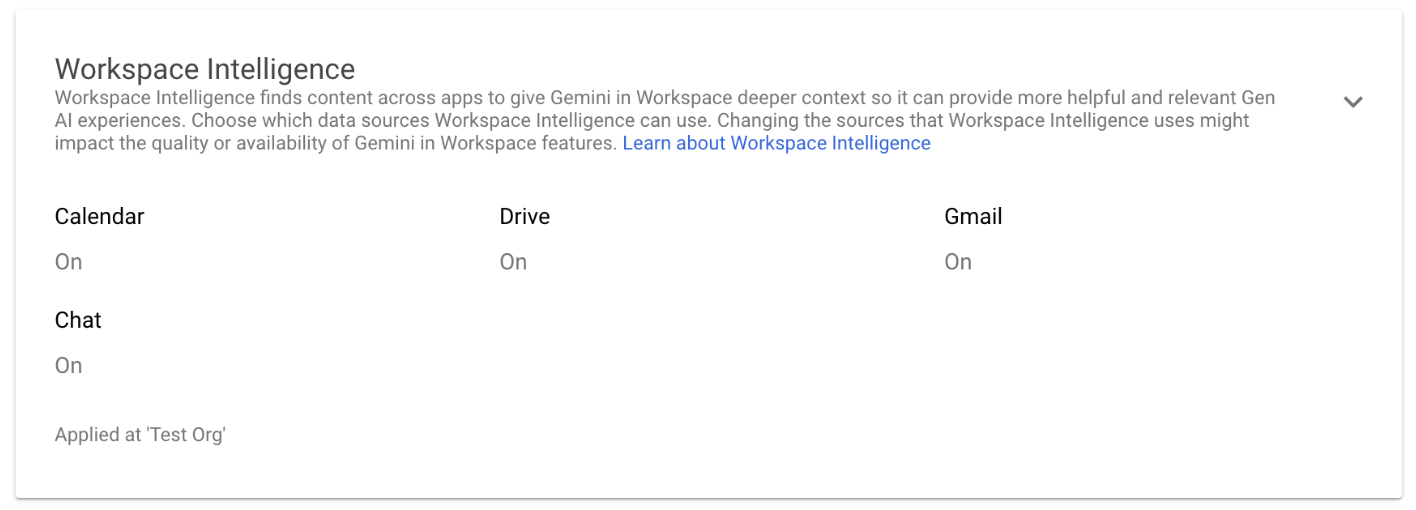
Just as important, Google attached governance language to the rollout. The Workspace Updates post says Workspace Intelligence is on by default, but administrators can disable data sources at the domain, OU, or group level. Google also reiterated that Workspace data is not used to train generative AI models outside Workspace and is not used for advertising. Those controls will matter if Google wants enterprises to treat this as operational infrastructure rather than a flashy optional add-on.
TechCrunch framed the broader push as Google trying to make AI feel like an office intern. That shorthand works up to a point, but the bigger product story is deeper. Google is trying to own the context layer that sits between a company’s documents and the actions people want to take with them. If that works, Workspace becomes harder to replace not because of any single app, but because the surrounding AI system understands how work is already being done.
## Why it matters
Enterprise AI is shifting from standalone chat interfaces toward tools that can pull context, preserve work state, and act across familiar software. Workspace Intelligence is Google’s attempt to make Workspace itself the place where that orchestration happens, which could strengthen lock-in while raising the bar for rivals building around narrower assistant features.
## Source notes
- Verified against Google’s Workspace blog announcement plus Workspace Updates rollout posts for admin controls, Docs, and Sheets - TechCrunch provided secondary framing on how Google is packaging the update for office-work users - Claims in copy were kept to announced features and rollout language, not speculative autonomy
SEO keyphrases: Google Workspace Intelligence, Gemini in Google Docs and Sheets, Google Workspace AI updates
Join the conversation